

Constellation
Use your Mac's models from your iPhone.
Constellation syncs your chats and projects across your Apple devices, and lets iPhone, iPad and Vision Pro use the models installed on your awake Mac. The weights stay on the Mac; only the active request and reply travel.
How it works
Turn it on once on each device.
Devices signed in to the same Apple Account find each other. Chat sync and Mac models need no pairing code, host ID or IP address.
Prepare the Mac
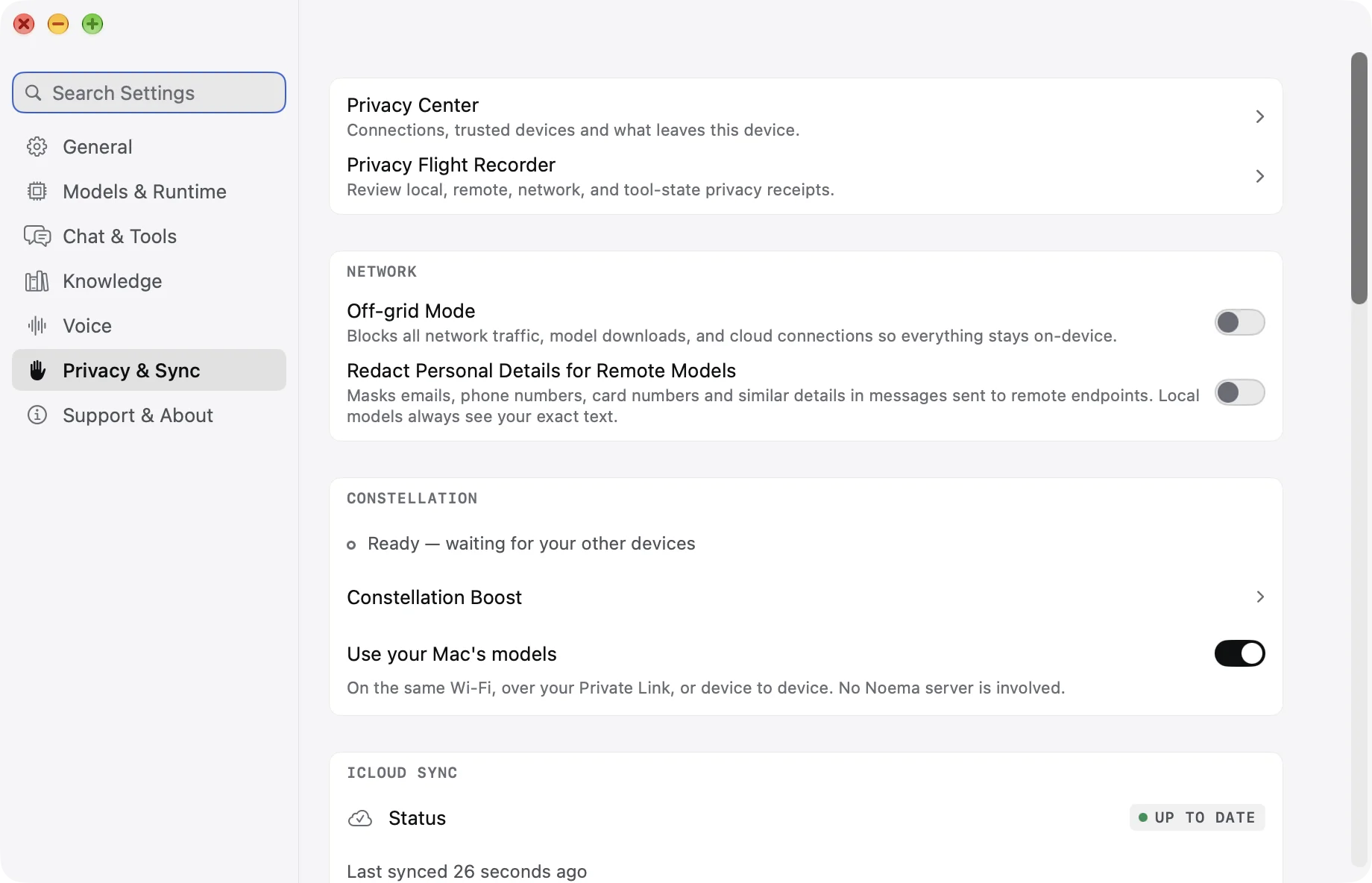
In Settings → Privacy & Sync, turn on Sync chats and Reach this Mac from anywhere. Leave Noema running and keep the Mac awake.
Connect from iPhone, iPad or Vision Pro
Open Stored → Constellation, turn on Sync chats and Use your Mac's models, and wait for the Mac to show as ready.
Press Use
Choose a model under the Mac. Noema starts loading it and picks a connection route before your first message. Chat opens right away.
Two kinds of continuity
Your chats follow you. Your Mac's models come with them.
Chats and projects sync through your private iCloud database. Model weights, files and indexes never leave the device that holds them.
What syncs
- Chats, messages, titles, favorites and bookmarks.
- Chat instructions, scratchpads and conversation content.
- Projects, shared instructions, source and folder references, and archive state.
- Tool history, web results and the route shown in a transcript.
- Deletions and regenerated turns.
What stays on each device
- Model weights and downloads.
- Datasets, PDFs, source files, indexes and embeddings.
- Per-device MCP server selections and runtime settings.
- Photo and media attachment files.
Project source references sync, but a device needs its own copy of a source before it can retrieve from it.
Tools and local knowledge
Tools run where your data is.
The model may run on your Mac, but the device that started the chat decides which tools are allowed and runs them. A PDF indexed on your iPhone can support a Mac-hosted model without copying the library to the Mac.
Best available route: Local Network, Private Link, Direct, Noema Bridge or Cloud Relay.
Tools a Constellation session can use
- Web Search
- Python
- Memory
- Calculator and Unit Converter
- Dataset search and retrieval
- PDF navigation
- Calendar
- Chart rendering
- Selected MCP tools
Tool availability still depends on the model, your tool switches, operating-system permissions, workspace policy and Off-Grid Mode. Photos work with remote vision models too: up to five images, 12 MB each and 40 MB in total.
Also part of Constellation
Boost, shared datasets and Remote Control.
Boost: faster prompts or more context
Let your iPhone help a supported Qwen 3.5 GGUF model on your Mac. Faster prompts shares long prompt processing; More context holds attention memory on the iPhone while the model stays on the Mac. Boost pairs the devices with a confirmation code over a USB cable, your local network or Direct Wi-Fi, and needs no internet connection.
- iPhone
- Mac
- Noema 4.1+
Use datasets shared by your Mac
Turn on Share with connected devices for an indexed dataset on your Mac. Another device can then retrieve passages from it: the Mac searches its own index and returns the matching text, while the original files and indexes stay on the Mac.
- iPhone
- iPad
- Mac
- Vision Pro
- Noema 4.1+
Control a Mac coding chat from iPhone or iPad
Send to a coding chat that belongs to your Mac, follow its progress and approve edits and ordinary commands from your phone or tablet. Remote Control is off until you turn on Allow Remote Control. Destructive commands, always-allow rules and network access are still approved on the Mac.
- iPhone
- iPad
- Mac
- Noema 4.2+
Connections
Noema picks the best route before you send.
When you press Use, Noema tests the available paths and selects the best working one. Chat shows which route is active.
| Route | When Noema uses it | What it means |
|---|---|---|
| Local Network | Both devices can reach each other on the same network. | The request goes straight to the Mac and usually has the lowest latency. |
| Private Link | You configured a Tailscale, ZeroTier or WireGuard address. | Traffic travels over your private mesh without router port forwarding. |
| Direct | The devices can open an encrypted peer-to-peer path across networks. | CloudKit introduces the devices, but no relay carries the conversation. |
| Noema Bridge | A restrictive NAT or firewall prevents Direct. | End-to-end encrypted bytes pass through Noema's relay, which cannot read the request or reply. |
| Cloud Relay | Faster routes are unavailable. | Requests and replies use your private CloudKit database. It is the slowest fallback. |
Privacy and control
Connected only when you choose.
Off by default
Remote Access stays off until you turn it on, on both the Mac and the requesting device.
Visible route
Chat tells you whether the connection is local, private, direct, bridged or using iCloud.
Off-Grid Mode wins
Off-Grid Mode pauses sync, discovery, Remote Access and network-backed tools.
Documentation
Read the guides.
Constellation
Your chats follow you, and your Mac’s models become available across your personal devices.
Read the guideConstellation models, tools and photos
The model runs on the Mac while the requesting device keeps control of tools, local knowledge, permissions, and the chat.
Read the guideConstellation connections and privacy
Noema tests the available paths when you press Use and selects the best working route before the first message.
Read the guide
One conversation across your devices.
Constellation is part of the Noema app on iPhone, iPad, Mac and Apple Vision Pro.